
Another hard drive solution for the Atari ST series usually isn't anything to write home about, let alone to grace it with an atariscne.org article - thankfully we seem to get swamped by SD card storage solutions for our beloved platform as of late.
But Jean-Matthieu Coulon's ACSI2STM stands out of the crowd - and this article tries to give a very quick glance why this is as close to a tangible storage revolution as we can get without someone reissuing the CosmosEx. Spoiler: you can forget about partitioning.
I can't stress this enough: you can forget about partitioning.
All the headaches, web searches and failed attempts that everyone waded through far too often are gone. It reads regularly formatted SD-Cards (meaning: FAT16/FAT32/ExFAT) and their content, just like your PC reads them!
Forget. About. Partitioning.
Other solutions often emulate a hard disk very closely, down to the original protocols that the ST and the hard disk spoke in ye olde times; that's good from a technical point of view, but terrible from a user standpoint. As a user, we have to actually understand, and even worse, remember which TOS version had which specific madness-inducing limitation, forcing us to have a gazillion of partitions on our systems. There are literally books about this madness where there's no method.
Being one of the newer "software defined hardware" class of devices (which is just a fancy term for: "we don't use pricy FPGAs" in this case), the ACSI2STM can do some interesting things. One of which is reading the (let's call it "PC formatted") SD card and translating its contents into something the ST (or rather it's TOS) can ingest.
In this so-called "GemDrive" mode the device is practically "driverless" - there is no need for the user to install anything, not on the SD card, not anywhere; only the device itself needs to be inserted into the ACSI port. Inserting a freshly bought SD card and it results in this:
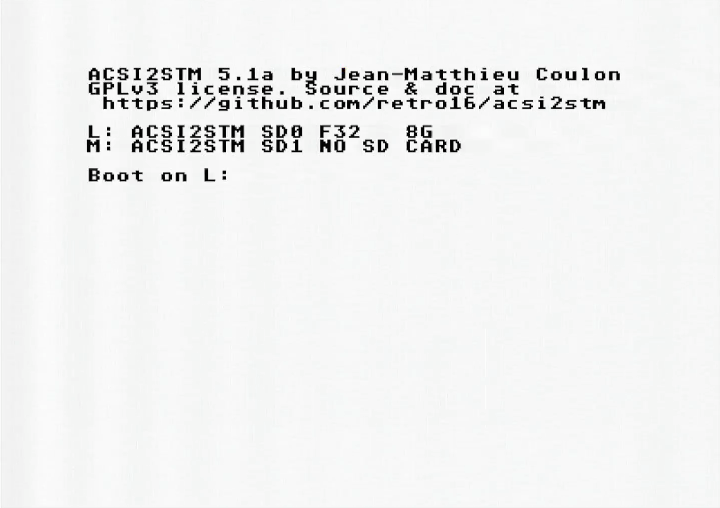
While this might not look particularly exciting, it is a big step forward to popularize hard drive use even more. Since partition sizes do not matter anymore (yes, the drive L above has 8GB, accessible under one drive letter) we can now just copy data on there from our modern devices and be done with it. I myself have a >2GB ST demo collection in one folder on there and it works like a charm - something that always was a real pain to organize with more classic storage solutions. For the curious: yes, it can boot as drive C, the drive letter configuration is basically configurable by choosing one of the three (yes, three) slots.
But what with software that needs real partitioned hard drives? While this is a rare case to boot, ACSI2STM has you covered on this front: there is a classic ACSI-mode too, that comes in two flavors: partition your SD card as you are used to or use an image file on your SD card. The latter is another nifty addition to our storage tool belt.
Is this a perfect device? This is not a review, but just let me just say: no. It isn't. As with any "fairly new" product there are problems. You might have problems with TOS <1.04 - don't use older versions. The Mega STEs cache is not supported as of yet (as in: it crashes) - disable the cache for now. As most devices that uses more modern MCUs and FPGAs it might not like your internal 5v power - use a (good!) external USB power plug. And if you are actually creating content on your ST (and if you do: here, take my hand and let me congratulate you for doing so!), do as with every storage solution that has TOS in the mix: backup often. Very often. In short: the usual edge-case-y kind of problems that even the Ultrasatan (as one of the oldest solutions) still has.
But the latest ACSI2STM firmware version 5.1a reached a level of maturity that made it a very valued addition to my tool belt and made the handling of SD cards a lot more fun. The developer being very responsive makes it pretty likely that things get be fixed (as they have been fixed in the past). Well, I say "fairly new" - the project has started in 2019, but the latest redesigns make it more closer to a 2022 device, which is... fairly new.
Oh, and did I mentions it's dirt cheap?
Since the ACSI2STM is open source, there's a wide variety of places to get one from (plus you can build your own, if that floats your boat);
- https://www.16-32bit.eu/shop ("regular", nano, internal Mega STE)
- https://store.sidecartridge.com/ (updated design, internal Mega ST, internal Mega STE)
- https://centuriontech.eu/product/sdrive/ (updated design)
- https://sordan.ie/product/1166/acsi2stm-sd-card-for-atari-st-acsi-hard-drive-emulator-stm2acsi/ ("regular")
This list is not intended to be exhaustive, you'll might find a few other sources out there.
And as with any hardware addition to our now 40-year old devices, your mileage may vary; as mentioned above there are some stories of people that had problems getting the device to work - but I hear a lot of success stories. If it's up to the task being your next daily driver, however, is up to you to test - but it's at least a good second solution to have.
I strongly believe that this device and its author deserve a little bit more visibility than they have gotten so far - after all it is a humble hard disk revolution.
🔗https://github.com/retro16/acsi2stm


Comments
First, I can absolutely confirm the quite frequent "research on TOS partitions limitations".
Currently, I am still living in the "ACSI-world", happily using Ultrasatan on my STE since 2009, a very reliable device: One slot is used for TOS partitions with Atari software. The idea, that using partitions to organize data is just a habit, trained by TOS limitations is quite funny btw :)
In my case, the other Ultrasatan slot is having a SD card with a very small sized partition (16 MB) for data exchange with the PC. Here, I found it's necessary to be really careful. Using irregular file and folder names can result in crashes on the Atari. So I developed the habit to always delete the ".Trash" and similar folders on PC before using the media on Atari.
Seems as the ACSI2STM is a very comfortable option and one could get rid of those issues in Gemdrive mode once for all. It's nice that the device offers both operation modes.
I see another possible advantage of the Gemdrive mode: in ACSI-mode we have to take the number of folders into account and optionally use the "FOLDR100.PRG" to prevent corruption. I suppose this is not necessary in Gemdrive-mode?
As you pointed out, for TOS 1.02 machines, Gemdrive is not supproted and one has to take the ACSI-mode route with the classy partitions size limitation troubles. With many available guides and threads on the topic, I found Jookies practical guide most helpful for the TOS 1.02 scenario: http://joo.kie.sk/?page_id=306
Anyway I think it's time to order a couple, can never have enough of gizmos for your Atari.
In other words, if something doesn't work in Hatari's GEMDOS HD, most likely it wont work with ACSI2STM's translated mode. I have seen tens of such cases. So it can easily backfire on inexperienced user -- suddenly, software just doesn't work for no obvious reason.
Btw I would maybe more emphasise that the clones you have mentioned are often completely different designs, so it's not like "choose your builder", it's really more like "choose your flavour".
mikro
This thread is a case in point.
I'm intrigued to learn more about which software doesn't like a Hatari GEMDOS style partition. I've not had issues personally, but don't get out and about as much as I should.